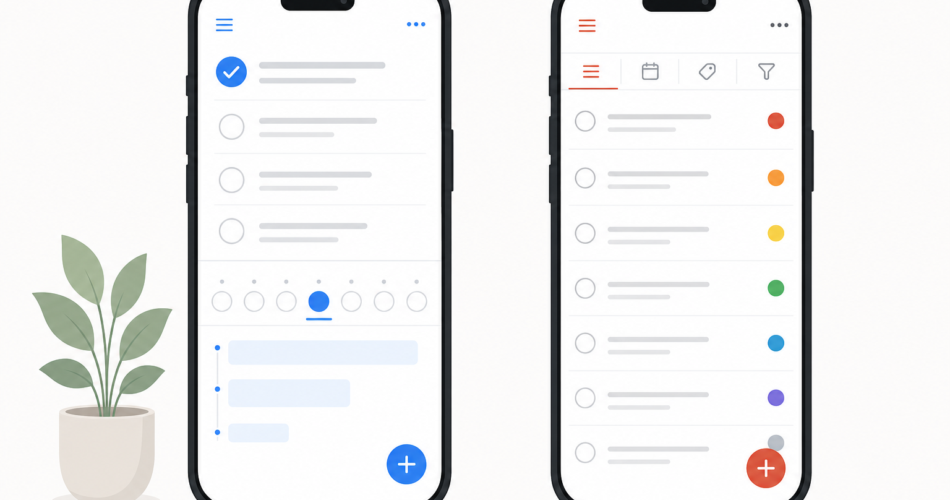
Any.do and Todoist are two of the most established names in personal task management – and they’re built on slightly different ideas about what a task app should be. Todoist is a fast, focused task manager. Any.do is a task and planning app that pulls your calendar and shared lists into the same place.
This comparison is written to help you choose, not to crown a winner. Both are good. The right one depends on how you work.
At a glance
| Any.do | Todoist | |
|---|---|---|
| Core idea | Tasks + calendar + daily planning | Fast, focused task management |
| Natural-language input | Yes | Yes (best-in-class) |
| Built-in calendar view | Yes | No (date layout only) |
| Time blocking | Yes, tasks + calendar in one view | Workaround via Google Calendar |
| Shared spaces / family plan | Yes – dedicated Family plan | Shared projects, no family plan |
| Platforms | iOS, Android, Mac, Windows, Web | iOS, Android, Mac, Windows, Linux, Web, wearables |
| Free plan | Unlimited tasks & subtasks | 5 projects, 5 collaborators each |
| Paid plan (individual) | $4.99/mo billed annually | $5/mo billed annually |
| Family option | 4 members, flat $8.33/mo annually | None |
The short version: Choose Any.do if you want one app for tasks, calendar, and shared lists. Choose Todoist if you want the fastest, most platform-flexible pure task manager and don’t need a built-in calendar.
Task capture and natural language
This is the one task app job nobody can afford to get wrong, and both apps are strong here.
Todoist sets the standard. Its natural-language parsing is the best in the category – type “Submit report every second Thursday at 3pm p1 @work” and it correctly captures the date, recurrence, priority, and label in one go. In early 2026 Todoist added Ramble, an AI voice feature that turns spoken thoughts into structured tasks. If you capture 20-plus tasks a day, this precision genuinely saves time.
Any.do also handles natural-language input well – “call dentist tomorrow at 3pm” becomes a properly dated task – and adds WhatsApp capture, so you can fire off a task by message or voice without opening the app.
Verdict: Todoist wins on raw parsing power for complex inputs. Any.do is very capable and adds WhatsApp as a capture channel. For most people the difference is small; for high-volume power users, Todoist has the edge.
Calendar and daily planning
This is where the two apps genuinely diverge – and for many people, it’s the deciding factor.
Any.do is built around planning. Tasks and your calendar appear in the same view, so you’re scheduling around the hours you actually have free. The “My Day” ritual walks you through your tasks each morning and asks what you’ll realistically do today, turning a long backlog into a short plan. Real time blocking works inside the app.
Todoist is built around the task list. It shows tasks by date and has a calendar layout, but it doesn’t merge with your actual calendar or support true time blocking – you’d connect Google Calendar as a workaround. Todoist’s philosophy is that it manages tasks and your calendar app manages time.
Verdict: Any.do wins clearly for anyone who plans their day by hours, not just dates. If you’re happy keeping tasks and calendar in separate apps, Todoist’s approach is perfectly valid.
Collaboration and shared lists
Both apps let you share, but they’re built for different kinds of sharing.
Any.do is designed around shared spaces. Its Family plan lets up to four people share calendars, projects, and a smart grocery board, while each person keeps a private personal space. This makes it a natural fit for couples and households.
Todoist supports shared projects with task assignment, comments, and file attachments. Its Business plan adds team workspaces and admin roles. But Todoist has no family-style plan, and it’s designed for lightweight collaboration – no dependencies, Gantt charts, or workload views.
Verdict: For families and households, Any.do is the stronger pick thanks to its Family plan and shared-space design. For light work collaboration, both work; for heavy team project management, neither is the right tool – you’d want a dedicated PM platform.
Pricing breakdown
Both apps are reasonably priced and offer free plans, but the structures differ.
Any.do
- Free: Unlimited tasks, subtasks, grocery lists, calendar integration, basic reminders.
- Premium: $4.99/month billed annually ($7.99 monthly) – advanced recurring and location reminders, Focus Mode, AI features, color tags.
- Family: $8.33/month billed annually ($9.99 monthly) – everything in Premium for up to four members, one flat price.
- Workspace: Per-member pricing for teams.
Todoist
- Free: 5 projects, 5 collaborators per project, basic reminders, 10 AI Ramble sessions/month.
- Pro: $5/month billed annually ($60/year) – 300 projects, full reminders, filters, attachments.
- Business: $8/user/month billed annually – team workspaces and admin tools.
Verdict: Any.do’s individual Premium plan is slightly cheaper than Todoist Pro, and its free plan doesn’t cap projects the way Todoist’s does. For families, Any.do’s flat four-person plan has no Todoist equivalent. Todoist’s free plan, while capped, is a genuine long-term option for simple needs.
Platforms
Todoist has the wider reach: iOS, Android, Mac, Windows, Web, Linux, and both major smartwatch platforms. If you need Linux or deep wearable support, Todoist is the answer.
Any.do covers iOS, Android, Mac, Windows, and Web – every platform most people use, but without Linux.
Verdict: Todoist for the widest possible coverage; Any.do covers the mainstream platforms fully.
Who should choose which
Choose Any.do if you:
- Want tasks and calendar together in one view
- Plan your day by available hours and use time blocking
- Need to share lists, calendars, and projects with a partner or family
- Want a clean, simple app that’s still capable
- Want a flat-price family plan
Choose Todoist if you:
- Capture a very high volume of tasks and want best-in-class natural-language parsing
- Are happy keeping tasks and calendar in separate apps
- Need Linux support or deep smartwatch integration
- Want the widest library of third-party integrations
- Prefer a pure, focused task manager with no extra features
Both apps offer free plans. If you’re genuinely torn, use each as your primary task app for a week – the daily-planning difference becomes obvious fast, and you’ll quickly feel which approach fits you.
Frequently asked questions
Is Any.do better than Todoist?
Neither is universally better. Any.do is better if you want an integrated calendar, real time blocking, and shared family spaces. Todoist is better if you want the fastest pure task capture and the widest platform coverage. They’re built on different philosophies.
Does Any.do have a calendar like Todoist doesn’t?
Yes. Any.do shows tasks and calendar events in one unified view and supports time blocking inside the app. Todoist displays tasks by date and offers a calendar layout, but it doesn’t merge with your actual calendar without connecting Google Calendar separately.
Which is cheaper, Any.do or Todoist?
Any.do’s individual Premium plan is $4.99/month billed annually, slightly less than Todoist Pro at $5/month billed annually. Any.do also offers a flat-price Family plan for four members, which Todoist has no equivalent for.
Can I switch from Todoist to Any.do?
Yes. Export your Todoist data first, then use Any.do’s third-party import to bring your tasks and lists across. Run both apps in parallel for about a week before fully switching, and recreate recurring tasks manually since they rarely import perfectly.
Which is better for families, Any.do or Todoist?
Any.do. Its dedicated Family plan covers up to four members for one flat price, with shared calendars, projects, and grocery lists plus a private space for each person. Todoist supports shared projects but has no family-specific plan.