Motion vs Any.do: Two Very Different Approaches to the Same Problem
The motion app vs any.do comparison starts with a fundamental question: do you want AI to schedule your day for you, or do you want a clean system that puts you in control? Both Motion and Any.do address the gap between tasks and calendar, but they do it from completely opposite directions. Understanding that difference will tell you immediately which one fits your work style.
What Is Motion?
Motion is an AI-powered scheduling app that automatically builds your daily schedule for you. You add tasks and set their priority, deadline, and estimated duration, and Motion’s algorithm slots them into your calendar around your existing meetings. When something runs long or a new urgent task comes in, Motion reschedules everything automatically. The idea is that you never have to manually decide when to work on something — the AI handles the scheduling logic.
Motion also has project management features, a team calendar, and meeting booking tools. It is designed to be an all-in-one workspace for individuals and small teams who want their schedule fully optimized. Motion is subscription-based and starts at $19 per month for individuals.
What Is Any.do?
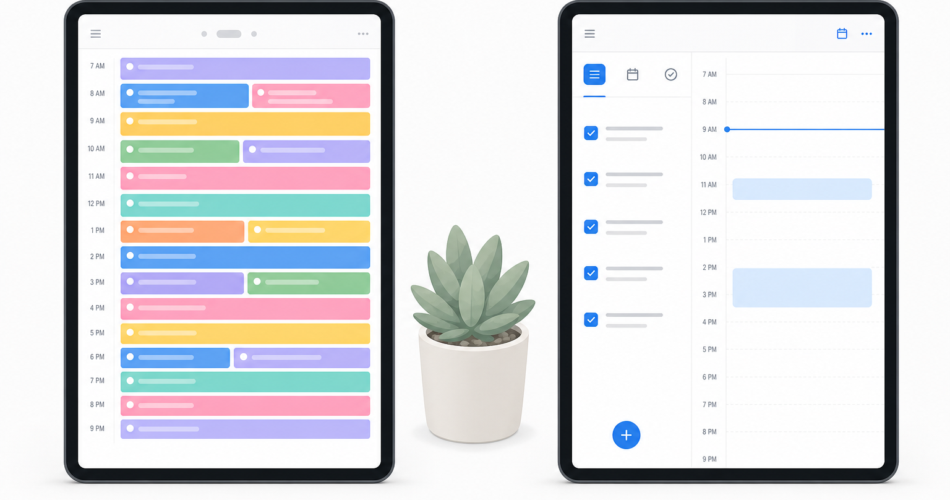
Any.do is a task manager with native calendar integration and an AI assistant that helps with planning without taking over. You add tasks, set due dates, and plan your day in a unified view that shows your tasks and calendar events together. The AI assistant suggests priorities and can help organize your inbox, but the final schedule is yours to decide. Any.do is built to be simple enough for personal use and powerful enough for team collaboration.
Any.do is available on a freemium model. The free tier covers the core experience, and premium adds features like calendar sync, recurring tasks, and AI planning. How Any.do’s calendar and task integration works for daily planning covers why the unified view is the central feature that drives how people use it.
Motion vs Any.do: Feature by Feature
AI Scheduling
This is the defining differentiator. Motion’s AI scheduling is the product. It automatically finds time for every task based on priority, deadline, and available calendar slots. When your day changes, it re-plans everything. For people who struggle with time estimation and scheduling, this feels transformative at first.
Any.do’s AI assistant is more of a planning coach than an auto-scheduler. It suggests what to work on based on your tasks and schedule, helps organize your inbox by priority, and can assist with daily planning. It does not take over your calendar or move things without your input.
Winner: Motion for full auto-scheduling. Any.do for AI-assisted planning where you stay in control.
Ease of Use
Motion’s auto-scheduling requires meaningful setup and trust in the algorithm. You need to accurately estimate task durations, set priorities correctly, and accept that Motion will move things around. When the algorithm makes a scheduling decision you disagree with, overriding it means working against the system rather than with it. New users frequently find the first week disorienting.
Any.do is designed to be usable immediately. There is no algorithm to configure and no trust-building period. You add tasks, see your calendar, and plan your day. The learning curve is measured in minutes.
Winner: Any.do.
Calendar Integration
Both tools integrate deeply with Google Calendar and other calendar providers. Motion’s integration is bidirectional by design — it reads your meetings and writes scheduled task blocks back to your calendar. This is the mechanism that makes auto-scheduling work.
Any.do’s calendar integration shows your existing events in the task planner view, and you can create time blocks for tasks that appear in your calendar. The integration is clean and practical without the complexity of full auto-scheduling. The Any.do Google Calendar sync is one of the most-used features in the app.
Winner: Depends on your preference. Motion for AI-controlled scheduling. Any.do for manual planning with calendar visibility.
Team Features
Motion has team features including shared projects, team scheduling, and a view of your team’s availability. These are built around the auto-scheduling model, so they work best when the whole team is using Motion.
Any.do’s team features are built around shared lists and task assignment. Shared task management for teams works naturally in Any.do because each person manages their own tasks while shared lists create visibility across the group. Teams do not need to use Any.do the same way individually in order to collaborate effectively.
Winner: Motion for teams that want integrated scheduling. Any.do for teams that want flexible shared task management.
Personal and Professional Use
Motion is a professional productivity tool. Its complexity and pricing do not make it a natural fit for personal use, grocery lists, or family coordination. It is built for knowledge workers managing a significant task load.
Any.do handles both professional and personal use naturally in the same app. Your work project lists and your personal tasks coexist without friction, which is valuable for anyone who wants one system rather than separate tools for work and life.
Winner: Any.do.
Pricing
| Plan | Motion | Any.do |
|---|---|---|
| Free | No free tier (trial only) | Yes, functional free tier |
| Individual | $19/month | Lower — monthly or annual |
| Team | $12/user/month (annual) | Team plan available |
Motion has no free tier. You can trial it, but staying requires a subscription that is among the more expensive in the task management category. Any.do’s free tier provides a complete experience, and premium pricing is meaningfully lower than Motion for individuals.
Winner: Any.do for cost efficiency and lower commitment to try.
What Motion Does Better
Being honest about the motion alternative question means acknowledging where Motion genuinely wins:
- Full auto-scheduling: If you want AI to own your schedule, not just assist with it, Motion is the only mainstream app built specifically for this
- Time estimation enforcement: Motion forces you to estimate task duration, which produces more realistic planning even when the algorithm does not place things perfectly
- Meeting optimization: Motion’s team scheduling and meeting booking features are more sophisticated than Any.do’s
- Handling overwhelming workload: When you have more tasks than time, Motion’s algorithm is better at surfacing what actually fits in your day
When to Choose Any.do Over Motion
- You want to stay in control of your schedule rather than delegating it to an algorithm
- You use Any.do for both work and personal life and want one unified system
- Cost is a factor — Any.do’s free tier and lower premium pricing remove the barrier to getting started
- Your team does not all need to use the same scheduling system — Any.do’s shared lists work without everyone being on the same platform
- You want simple, fast task capture without the overhead of duration estimates and priority configuration
The Bottom Line
Motion is a powerful tool for a specific type of user: someone with a very high task load, good self-discipline about estimating task durations, and a willingness to trust an algorithm with their daily schedule. For that user, it can be genuinely transformative.
For most people, Any.do is the stronger choice in 2026. It delivers the core benefit of seeing tasks and calendar together, includes AI assistance that helps without overriding your judgment, and works for personal and professional tasks in the same app. The lower friction and lower cost mean faster adoption and fewer reasons to abandon it.
If you are exploring motion alternatives and want to see how Any.do handles daily planning with calendar integration, try it free and have your lists set up in the time it would take to configure Motion’s onboarding.