The WhatsApp Task Management Problem
Any.do WhatsApp integration addresses a specific and common productivity failure: the task that gets buried in a chat thread. WhatsApp is where a significant portion of modern communication happens, both personal and professional. Group chats coordinate family logistics. Direct messages handle work requests, follow-ups, and commitments. Voice notes carry information that would take longer to type. And running through all of it, invisible and uncaptured, are the tasks: “Can you send me that file by Thursday?”, “Don’t forget we need to call the plumber about the kitchen”, “Let me know what you decide and I’ll move forward.” These commitments arrive in the flow of conversation, get acknowledged in the moment, and then compete with everything else in the chat thread for visibility until they are missed.
The whatsapp task management problem is that the chat thread is not a task manager. It has no due dates, no priority flags, no daily planner view, and no way to separate what requires action from what is just conversation. Messages scroll up and past. Important commitments made on Monday are several screens above where the conversation is by Friday. The solution is not to use WhatsApp differently. It is to connect WhatsApp to a system that is actually built to hold tasks, surface them on the right day, and plan them against a calendar.
How Any.do + WhatsApp Works
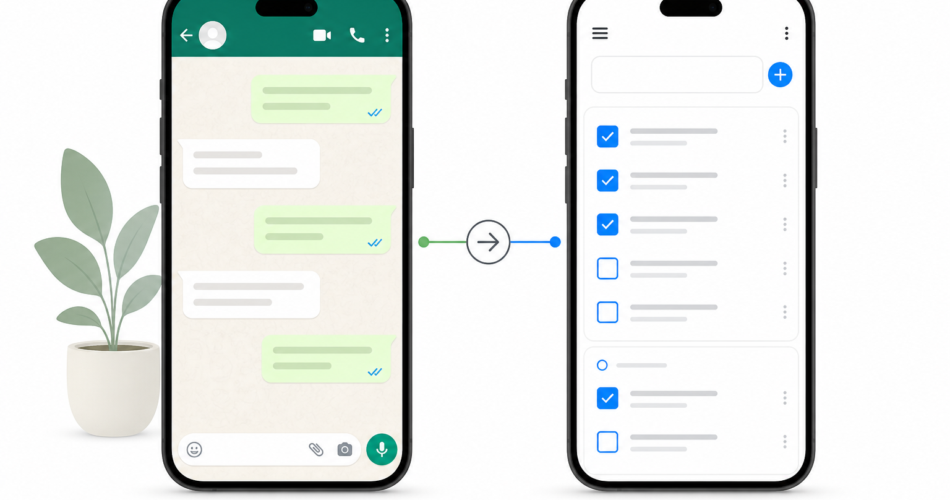
The Any.do WhatsApp integration connects your Any.do account to WhatsApp through the Any.do bot. Once connected, you can send tasks to yourself directly from WhatsApp, get reminders delivered via WhatsApp notification, and capture commitments from any conversation in seconds by forwarding a message to the Any.do bot. Tasks created via WhatsApp appear in your Any.do account with the same full functionality as tasks created anywhere else: due dates, priority flags, subtasks, recurrence, and calendar integration.
The integration works in both directions. Tasks created in Any.do can trigger WhatsApp reminders when they are due, which means your reminders reach you through the app you are already watching throughout the day rather than requiring a separate notification check. For many users, WhatsApp notifications are more reliably seen than push notifications from any other app, which makes WhatsApp the ideal reminder delivery channel for tasks that genuinely cannot be missed.
The practical effect is a closed loop between conversations and action: a commitment made in WhatsApp becomes a task in Any.do, which surfaces as a WhatsApp reminder when it is due, which brings you back to Any.do to mark it complete. The conversation and the task management system work together rather than operating as separate silos where commitments get lost in the gap between them.
Setting Up Any.do + WhatsApp: Step-by-Step
- Open Any.do and go to Settings. In the mobile app, tap the profile icon or the settings gear. In the web app, navigate to your account settings. Look for the Integrations or Connected Apps section.
- Find the WhatsApp integration and tap Connect. Any.do will display the setup flow for the WhatsApp integration. You will be shown a QR code or a link to initiate the WhatsApp connection.
- Scan the QR code with WhatsApp or follow the link. On your phone, open WhatsApp and use the linked device flow to connect, or tap the link which will open a WhatsApp conversation with the Any.do bot automatically.
- Confirm the connection in the WhatsApp chat. The Any.do bot will send an introductory message. Reply to confirm the connection and complete the authentication. Your Any.do account is now linked to WhatsApp.
- Send your first task. In the Any.do WhatsApp bot chat, type a task in natural language: “Call the accountant tomorrow at 2pm” or “Submit the quarterly report by Friday.” Any.do interprets the date and time from natural language and creates the task with the correct due date automatically.
- Configure reminder delivery preferences. In Any.do settings, choose whether task reminders should be delivered via WhatsApp notification, standard push notification, or both. For tasks where visibility is critical, WhatsApp delivery ensures the reminder arrives in the app you are most likely to be actively using.
The Fastest Any.do WhatsApp Capture Flows
Forwarding messages to create tasks
The highest-leverage use of the Any.do WhatsApp integration is forwarding messages directly to the Any.do bot. When a message arrives in any WhatsApp conversation that contains a task or commitment, long-press the message, tap Forward, and send it to the Any.do bot. Add a due date or context in the forwarded message if needed, and the task is captured. The original conversation continues without interruption. The commitment is now in Any.do where it will surface at the right time rather than buried in a scrolling thread.
This workflow takes approximately ten seconds and requires no app-switching beyond the forward action. It is faster than switching to Any.do, creating a task manually, and returning to WhatsApp, and it preserves the original message text as the task name so the context is not lost.
Capturing your own commitments in real time
When you make a commitment in a WhatsApp conversation, the capture window is the moment the conversation ends. Switching to the Any.do bot chat and typing the task while the context is fresh takes under a minute. “Follow up with [name] about the proposal by Wednesday” or “Book the restaurant for Friday night” go into the bot chat immediately rather than into memory, where they will compete with everything else until they surface as a missed follow-through.
The commitments that create overwhelm are almost always the ones that were captured somewhere unreliable, or not captured at all. WhatsApp is one of the most reliable capture channels available precisely because the bot chat is always one tap away inside the app you are already using.
Using Any.do as a WhatsApp reminder channel
For users who check WhatsApp throughout the day more reliably than any other app, routing Any.do reminders through WhatsApp improves follow-through on time-sensitive tasks. A reminder that arrives in WhatsApp is seen in the same flow as messages from family members, colleagues, and friends, which means it is less likely to be missed than a push notification that arrives while WhatsApp is open and dismisses before it is read.
Setting WhatsApp as the primary reminder channel for your most important daily tasks, while leaving standard push notifications active for the rest, creates a two-tier reminder system where the tasks that matter most get the delivery channel with the highest visibility.
WhatsApp Task Management in Practice: Common Use Cases
Family and household coordination
WhatsApp group chats are how most families coordinate logistics: school schedules, grocery needs, appointment reminders, and the ongoing operational management of a household. Requests and reminders that arrive in the family chat are easy to acknowledge and easy to forget. Any.do’s shared list feature combined with WhatsApp capture creates a household task system where items from the family chat become real tasks with due dates rather than obligations that depend on memory.
Work commitments from professional WhatsApp groups
In many industries and regions, WhatsApp has become a primary professional communication channel. Client requests arrive via WhatsApp. Team coordination happens in group chats. Commitments made in these conversations carry real professional consequences when missed. The same capture discipline that prevents tasks from being lost in Slack applies to WhatsApp: every commitment that arrives in a chat thread belongs in a task manager, not just in the thread.
Personal reminders and quick capture
The Any.do WhatsApp bot serves as a fast personal inbox for anything you want to capture quickly and process later. An idea you want to come back to. A link you want to save with a follow-up reminder. A task you thought of while in the middle of another conversation. Sending it to the bot immediately, before the thought is displaced by the next conversation, is faster than switching apps and more reliable than trusting memory.
This is the same logic that makes turning emails into tasks valuable: the capture happens at the point of contact, in the moment of awareness, rather than requiring a separate dedicated capture session that may or may not happen before the thought fades.
Getting the Most Out of the Any.do WhatsApp Integration
The integration is most effective when it becomes a reflex rather than a deliberate workflow step. The goal is for “forward to Any.do bot” to become as automatic as dismissing a notification, so that the capture decision does not require any friction or deliberation. A few days of intentional practice, forwarding every task-bearing message to the bot rather than relying on memory, is usually enough to establish the habit.
Pair the WhatsApp capture habit with a daily planning session in Any.do to close the loop completely. Tasks captured through WhatsApp during the day are reviewed in the evening, given due dates if they were captured without one, and placed in the daily planner view for the day they need to be done. Time-blocking the tasks that require focused attention alongside the calendar keeps the WhatsApp-captured items from floating as undated intentions in the backlog.
Starting each day with the most important task in the Any.do daily planner, whether it originated in a WhatsApp message, an email, or direct entry, is the practice that keeps the capture loop from becoming a collection exercise. Tasks captured through WhatsApp are only valuable if they surface in the daily planning view at the right time and get done. The integration handles the capture. The daily planner handles the execution.
Any.do WhatsApp: The Integration That Meets You Where You Are
The most effective productivity tools are the ones that fit into existing behavior rather than requiring new behavior to be built around them. WhatsApp is already where a large part of your communication happens. The Any.do WhatsApp integration connects that existing behavior to a task management system without requiring you to change how you use WhatsApp. Conversations continue as they always have. Tasks that emerge from those conversations now have a reliable home.
If you want to try the any.do whatsapp integration and see how it changes the way tasks move from conversation to completion, Any.do is free to get started. The integration setup takes a few minutes, the WhatsApp bot is available immediately after connecting, and the daily planner view that surfaces your captured tasks is available on the free tier without any additional configuration.