
Why Task Management for Teachers Is Its Own Problem
Task management for teachers does not look like task management for most other professionals, and generic productivity advice tends to miss the specific ways a teacher’s workload is structured. The school day is largely non-negotiable: classes are scheduled, bells ring, students arrive. But the work that surrounds the school day, the lesson planning, the grading, the parent emails, the IEP documentation, the committee meetings, the professional development hours, the curriculum mapping, the supply ordering, has no fixed schedule at all. It expands into whatever time is available, including evenings, weekends, and summers that were supposed to be a break.
The core teacher productivity challenge is not finding motivation or improving focus. It is building a system that captures the full scope of what the job requires, makes the invisible work visible before it becomes urgent, and protects some portion of non-school time from the permanent encroachment of school tasks. This guide is about building that system in a way that fits how teachers actually live and work.
The Four Categories of a Teacher’s Task Life
Before building a task system, it helps to map what actually needs to be tracked. Teacher workloads fall into four distinct categories, each with different urgency, frequency, and time requirements.
Instructional planning
Lesson plans, unit plans, curriculum mapping, and the daily prep work for each class period. This is often the most time-consuming category and the one most teachers feel behind on. It is also the category most likely to be done reactively, in the hour before class, rather than proactively, with time to prepare thoughtfully.
Student assessment
Grading, feedback, entering grades into the learning management system, returning work, and tracking which students need additional support. Assessment tasks have the uncomfortable property of accumulating quietly and then becoming a mountain all at once. Thirty essays assigned on Friday are thirty essays to grade by Monday, and the only way to prevent that crisis is to plan the grading workload before the assignment goes out.
Communication and administration
Parent emails, student conferences, IEP and 504 meetings, administrative reporting, attendance documentation, and the ongoing bureaucratic work that schools generate. These tasks tend to arrive unpredictably and require responses within specific timeframes that create urgency whether or not the work is actually important.
Professional obligations
PD hours, committee work, department meetings, contract-required duties, and the longer-horizon obligations like recertification, degree requirements, and evaluations. These tasks have distant deadlines that make them feel deferrable right up until they are not.
Building a Teacher Task System in Any.do
Create one list per category
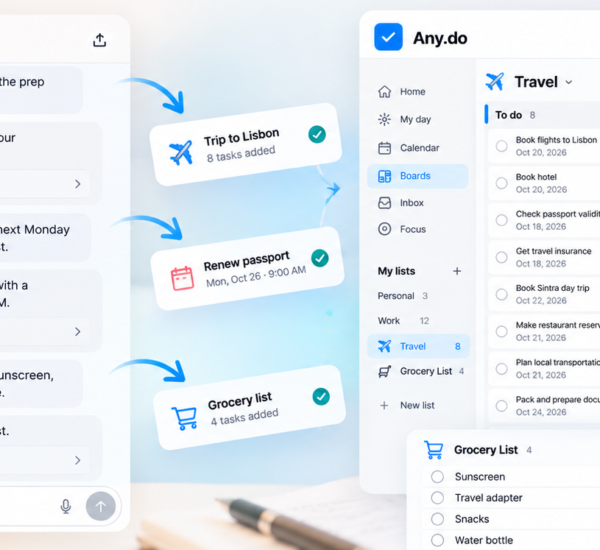
Set up four lists in Any.do that mirror the four categories: Instructional Planning, Assessment, Communications, and Professional. Keep a fifth list for personal tasks outside of school. This structure means that when you sit down to plan your week, you can look at each category separately and make deliberate choices about what gets prioritized rather than facing a single undifferentiated pile of everything.
The daily planner view in Any.do pulls tasks from all lists into a single view for the day, which means you retain the cross-list visibility you need for daily planning without losing the organizational clarity of separate lists for each category. You plan at the list level; you work at the daily level.
Date everything against your actual school week
The most common failure in teacher task management is adding tasks without due dates and trusting yourself to get to them during the week. Undated tasks become invisible. The planning period that was supposed to handle three undated grading tasks instead gets consumed by a parent phone call and an emergency IEP meeting, and nothing on the list was scheduled with enough specificity to survive that disruption.
Every task in your system should have a due date. Not a vague “this week” assignment, but a specific day. For assessment tasks, the due date should be set before the corresponding assignment goes out: if thirty essays are due Friday, a grading task should be dated the weekend or Monday, not left undated. Dating every task with a specific day is what makes a teacher’s task list a planning tool rather than a guilt list.
Block your planning periods in advance
Planning periods are the most valuable scheduled time in a teacher’s week, and they are also the most consistently overrun by reactive work. A planning period without a pre-made plan for how to use it defaults to the most pressing reactive task, whether or not that is the most important use of the time.
Before each week begins, decide what the planning period will be used for. Add those decisions to Any.do as tasks dated to the specific day of each planning period. When you walk into the planning period knowing that it is designated for grading the lab reports and writing Tuesday’s lesson outline, you are far more likely to do those things than if you walk in and survey the full list of everything that needs to happen eventually.
Time-blocking your planning periods against specific tasks is the single highest-leverage change most teachers can make to their weekly productivity. The time is already there. The question is whether it is used intentionally or reactively.
Managing Grading Without Letting It Take Over
Grading is the task category that most consistently escapes teacher task management systems, because it arrives in waves determined by assignment due dates rather than by what the teacher’s schedule can actually absorb. The solution is planning the grading before the assignment goes out, not after the papers arrive.
The grading plan-ahead rule
Before assigning any work that requires grading, answer three questions in your task system: When is this due? When will I grade it? When will I return it? If you cannot answer all three before the assignment goes out, the assignment’s due date needs to change or the grading timeline needs to be adjusted. Adding a grading task to Any.do dated to the day you plan to grade, not the day the work was due, converts a reactive pile into a scheduled obligation.
The related discipline is not assigning more work than you have time to grade. A teacher who assigns three major written assignments in the same week, with planning periods committed to other obligations, has created a grading debt that will only be repaid at the cost of personal time. The task system makes this visible before it happens rather than after.
Use subtasks for large grading batches
A batch of 30 essays is not one task. It is 30 small tasks that can be distributed across several sessions. Breaking a large grading batch into smaller subtasks, “Grade period 1 essays (10),” “Grade period 2 essays (10),” “Grade period 3 essays (10),” allows you to make meaningful progress in a single planning period rather than facing the full batch as an undivided obligation. Any.do’s subtask feature supports this breakdown without requiring a separate organization system.
Protecting Time Outside School
The structural challenge of teacher task management is not only managing what needs to happen during school hours. It is preventing the infinite expandability of school work from consuming all available personal time. Teaching is a job where there is always more that could be done: more feedback to write, more lessons to refine, more parent communication to send. The system can never be “finished.” The only way to have a life outside teaching is to decide that it ends, on a schedule, not when the list is empty.
Set a hard stop time
Decide what time school work ends on school days and on weekends. Not “when I’m done” but a specific time. 6pm on weekdays and noon on Saturdays, or whatever reflects your actual priorities. Mark this time in your calendar and treat it as fixed. The shutdown ritual is the transition out of school mode: at the designated time, review tomorrow’s plan, capture any open items, and close the work. What is not done moves to tomorrow, not to your evening.
Separate school tasks from personal tasks in your system
Keeping school tasks and personal tasks in separate Any.do lists, rather than one combined list, means that when you sit down for personal time you can close or ignore the school lists without having personal tasks buried underneath school obligations. The personal list contains the things that belong to your life outside school, and its visibility during personal time is not diluted by the presence of thirty school tasks.
The Sunday Planning Session
The most effective single habit for teacher productivity is a Sunday planning session. Fifteen to twenty minutes, once a week, to review the coming school week in full. This session answers specific questions:
- What are the key instructional moments this week, and is the planning done for each?
- What assessments are due this week, and when is the grading scheduled?
- What communications are expected or overdue?
- What professional obligations fall this week?
- What are the planning period assignments for each day?
The Sunday planning session converts Monday morning from a scramble into a clean start. When you walk into school Monday knowing exactly what you are teaching in each period, what is due from students this week, and what your planning periods are allocated to, the reactive chaos of the school day has less room to derail the work that actually matters.
Any.do’s daily planner view alongside the calendar makes this Sunday session fast. You can see each day of the week, the scheduled calendar events, and the tasks already assigned to each day. The session is about filling in what is missing and confirming that what is there is realistic, not about rebuilding the system from scratch each week.
Start With What You Are Already Tracking in Your Head
Most teachers are already managing their task list mentally, which is the most cognitively expensive and least reliable method available. The first step of a better system is the same for everyone: get it out of your head. Take fifteen minutes and write down every school-related task that is currently living in your memory. Grading that needs to happen. Emails that need to be sent. Lessons that need to be planned. Documents that need to be filed. All of it.
Once it is in a system with due dates and categories, the mental load drops immediately. The list is no longer a thing you are holding in your head at 10pm. It is a thing you will look at tomorrow morning and work from systematically. That shift alone changes how evenings feel.
If you want a task management system that fits the structure of a teacher’s workload, with separate lists, daily planner view, calendar integration, and fast mobile capture for tasks that arise during the school day, Any.do is free to get started. The system works out of the box without configuration overhead, and it stays organized with minimal weekly maintenance.