
Why Task Management for Students Is Harder Than It Looks
Task management for students is not just about remembering when assignments are due. It is about managing a workload that spans multiple courses with unrelated deadlines, projects that require weeks of gradual work alongside assignments that need to be done overnight, a social and personal life that matters, and the constant low-grade awareness that something important might be slipping. Most students manage this with a combination of the course syllabus, calendar reminders, and memory, and most students experience the semester creeping up on them at least once per term with a deadline they did not see coming.
The student productivity app question is worth taking seriously. A good task management system does not just remind you of deadlines. It helps you plan the work that leads up to them realistically, makes the full scope of each week visible before the week starts, and gives you enough visibility into the next few weeks that you can avoid the crunch that comes from leaving everything to the last possible moment. This guide is about building that system in a way that actually gets used, not just set up once and abandoned.
The Semester Overview: Getting Everything Into One Place
The first step of any effective student task management system is a semester overview: getting every deadline from every syllabus into one place at the start of the term. This sounds obvious but most students skip it, either because it feels tedious or because the semester feels far away enough that it does not seem urgent yet.
Spend two hours at the start of each semester going through every course syllabus and adding every assignment, exam, project deadline, and presentation to Any.do with a due date. Every single one. Do not filter or decide which ones matter. Get them all in. The goal at this stage is not prioritization. It is visibility.
Once everything is in the system, two things become immediately clear: which weeks are heavy (multiple major deadlines converging) and which weeks are light (enough breathing room to work ahead). Without this overview, heavy weeks are discovered in real time as they arrive, leaving no time to prepare. With it, you can see a heavy week coming in Week 10 from the vantage point of Week 2 and begin working ahead on the projects that will converge there.
Structuring Your Task System as a Student
One list per course, plus one personal list
Create a separate Any.do list for each course you are taking. This keeps course-specific tasks organized and makes it easy to see, at a glance, what is outstanding for each class individually. Add a personal list for non-academic tasks: appointments, errands, personal commitments, and anything else competing for your time that is not coursework.
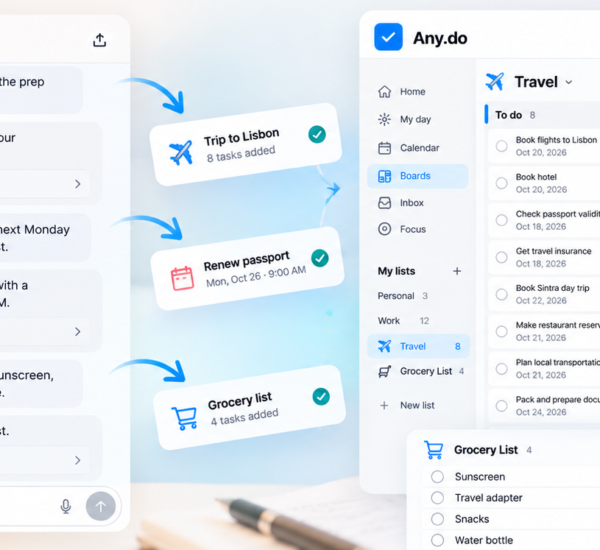
The daily planner view in Any.do shows tasks from all lists in a single view for the current day, which means you retain full visibility across all your courses without needing to check each list separately. The list structure provides organization; the daily view provides the unified picture you actually plan from.
Two types of tasks: deadlines and work sessions
Student task management involves two very different types of tasks that should be tracked differently.
Deadline tasks are fixed: the essay is due Friday, the exam is Tuesday, the group presentation is Week 8. These go into Any.do with their actual due dates and live in the course list until they are completed.
Work session tasks are the sessions that lead up to the deadline: “Read chapters 4 and 5,” “Draft introduction,” “Review lecture notes from Week 6,” “Practice presentation with group.” These need their own due dates, set based on when you plan to actually do the work, not based on the assignment’s final deadline. A ten-page essay due in two weeks requires multiple work sessions this week and next week, not a single task dated two weeks from now.
Most students only track deadline tasks. The essay is on the list with Friday’s date. The problem is that the essay does not get done on Friday by magic. It gets done through a series of work sessions that need to be planned and scheduled. Time-blocking your study sessions for specific work and adding those sessions as tasks in Any.do is what converts a list of deadlines into a realistic study plan.
The Weekly Planning Session: Sunday Night or Monday Morning
The single most effective habit for student productivity app users is a weekly planning session at the start of each week. Fifteen to twenty minutes, once a week, to look at the coming week in full.
The planning session answers four questions:
- What is due this week? Check every course list for tasks with this week’s dates.
- What major deadlines are coming in the next two to three weeks? Identify anything that needs prep work to begin this week.
- How many study hours are realistically available? Account for classes, commitments, and the personal time that is also legitimate.
- What specific work sessions can be scheduled? For each piece of work that needs to happen, pick a day and add it to Any.do.
The planning session prevents the Sunday night crisis that comes from discovering on Sunday that a major assignment is due Monday. If the planning session happened the previous Sunday, the assignment has been in progress all week. If it did not happen, Monday morning starts with a panic.
Managing Long-Term Projects Across the Semester
The tasks that cause the most academic stress are not the weekly assignments. They are the large projects, term papers, research reports, and group presentations that are assigned early in the semester with far-off deadlines. These tasks are easy to defer indefinitely because their deadline is always sufficiently distant to justify another week of waiting.
Break large projects into milestone tasks immediately
As soon as a large project is assigned, break it into milestone tasks in Any.do and give each one a due date. For a research paper due in Week 12, the milestones might look like: topic selected (Week 2), initial research complete (Week 4), outline complete (Week 6), first draft complete (Week 9), revisions complete (Week 11), final proofread and submission (Week 12). Each milestone becomes a separate task in the course list with its own due date.
This breakdown does two things. First, it makes the project feel manageable because it is a sequence of small next steps rather than one overwhelming obligation. Second, it puts early work sessions on the calendar long before the deadline pressure arrives. The research that happens in Week 4 is not done under deadline stress. It is done on schedule because the task exists and has a date.
The two-week rule for large projects
Any project with a deadline more than two weeks away should have at least one work session task in your system within the current week. If the project is four weeks away and no work session is scheduled in the next seven days, the project is at risk of being deferred until the last week before it is due. The two-week rule is a forcing function: large projects are always in progress, not waiting to be started.
Exam Preparation as a Task Management Problem
Exam preparation is where student task management tends to fail most spectacularly, because exam dates are visible far in advance but the preparation tasks are invisible until the week before the exam. The student who adds “Study for chemistry exam” to their list on the night before the exam has not made a task management error. They have made a planning error that happened weeks earlier when they did not create the preparation tasks.
For each exam, create preparation tasks in Any.do starting at least two weeks before the exam date. “Review lecture notes from Weeks 1-4,” “Complete practice problems from Chapter 6,” “Redo the first quiz,” “Create summary sheet for formulas” are the kinds of tasks that should be distributed across the days leading up to the exam rather than compressed into a single all-nighter.
Prioritizing exam prep tasks against other coursework in the weeks before exams is the practical benefit of having a system that shows everything in one place. When you can see that Week 9 has both a major essay deadline and two exams, you can begin distributing the preparation work into Weeks 7 and 8 rather than discovering the collision in Week 9.
Protecting Personal Time Without Falling Behind
One of the most common student productivity problems is the guilt that attaches to any non-academic time when coursework exists. If the task list is a permanent reminder of everything undone, relaxing or socializing carries a background hum of anxiety about the work that is not happening. This mental overhead is real and it degrades both the quality of rest and the quality of work.
A task system that includes personal tasks alongside academic ones solves this by making personal time explicit and legitimate. When your gym session, dinner with friends, and personal errands are in the same system as your coursework with their own due dates, the task list becomes a complete picture of your week rather than a guilt ledger focused exclusively on academic obligations. Time that is not allocated to coursework is not laziness. It is part of the plan.
The related discipline is setting a consistent daily stop time for academic work. Not “when I’m done” but a specific time. Work happens until 10pm; after that, the task list closes. What is undone moves to tomorrow. The end-of-day shutdown that reviews tomorrow’s plan and closes the work is as useful for students as it is for anyone else managing a high-volume workload.
Start With the Syllabus Upload
The highest-return investment for any student starting a new term is two hours at the beginning of the semester to get every deadline from every syllabus into any task system, including Any.do. Not some of the deadlines. All of them. With due dates. In the right course list.
After that, the system is not empty and vague. It is a semester-level picture of everything that needs to happen, visible from day one. Every subsequent planning session, weekly review, and daily task list is built on top of that foundation rather than reconstructed from memory each time something comes due.
If you want a student productivity app with a daily planner view, calendar integration, and the list structure to keep multiple courses organized in one place, Any.do is free to get started. The semester overview, weekly planning sessions, and daily view all work on the free tier, and the mobile app makes it fast to capture and check tasks between classes.