
Why Task Management for Lawyers Is Different
Task management for lawyers is not a productivity problem in the ordinary sense. It is a risk management problem. A missed court deadline is not an inconvenience. It can mean a dismissed case, a malpractice claim, or a bar complaint. A client commitment that slips through the cracks is not just a service failure. It damages a relationship that took years to build and may be impossible to repair. For lawyers, the cost of a broken task management system is not lost efficiency. It is professional and ethical exposure.
The demands that make lawyer productivity app requirements distinct from general task management include: managing multiple active matters simultaneously, each with its own deadlines and client relationships; tracking court-imposed deadlines that cannot be negotiated or extended; maintaining confidentiality across client matters; and keeping detailed records of work performed for billing purposes. A system that handles one of these well but fails on the others is not adequate. The right task management approach for lawyers addresses all of them in a single, reliable structure.
The Three Task Categories Every Lawyer Needs to Track
Hard deadlines: court dates, filing deadlines, statute of limitations
Hard deadlines are the non-negotiable layer of legal task management. Court appearances, filing deadlines, response windows, and statutes of limitations are set externally and carry consequences for missing them that no other profession faces in the same way. These tasks require not just a due date but a multi-stage reminder structure: a flag 30 days out, a prompt one week out, and a same-day confirmation that the work is complete and filed.
Every hard deadline should exist in your task system with the exact date, the matter it belongs to, and a chain of preparatory tasks that work backward from the deadline. The filing is not one task. It is the court deadline task plus the drafting task, the review task, and the client approval task, each with their own due dates that ensure the filing task has everything it needs when it comes due.
Client commitments: calls, updates, document delivery
Client commitments are the relationship layer of legal task management. When you tell a client you will call them Thursday, send the draft by Friday, or have an answer by end of week, those commitments need to be tasks with due dates, not mental notes. The volume of active client relationships a busy lawyer manages makes memory an unreliable system. What you can remember is how good your task system is at surfacing the right commitment at the right time.
Client commitment tasks benefit from the same multi-matter structure as court deadlines. Each client or matter gets its own task context so that when you are working on a specific client’s work, all tasks related to that client are visible together rather than scattered through a general list.
Internal casework: research, drafting, strategy, preparation
Internal casework tasks are the substantive work of lawyering: legal research, document drafting, deposition preparation, settlement analysis, case strategy review. These tasks rarely have the hard deadline structure of court filings, but they drive the quality of the output that does meet hard deadlines. Casework tasks need to be planned against the actual calendar available between court appearances and client calls, with realistic time estimates that account for the depth of focus they require.
Building a Matter-Based Task Structure
The most effective task management for lawyers organizes work by matter, not by task type. A single task list mixing tasks from a dozen active matters creates a daily cognitive load problem: every time you work on a task, you need to reconstruct the context of the matter it belongs to. Organizing by matter keeps all the context for each client relationship together.
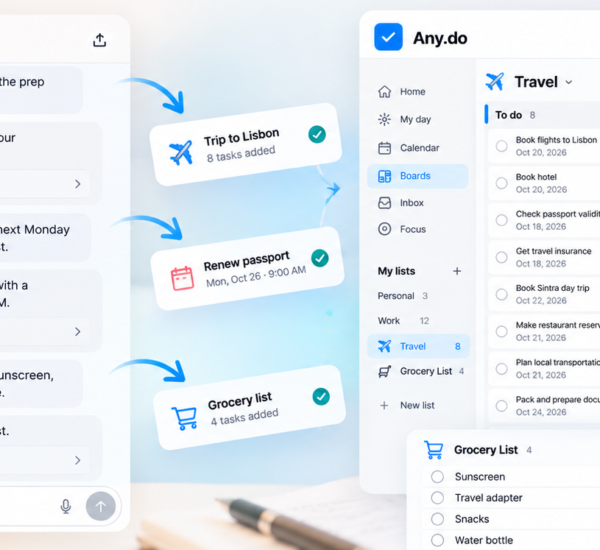
In Any.do, this maps to a list per active matter. Each list contains all the tasks for that matter: court deadlines, client commitments, casework, and billing reminders. When you are working on a specific matter, you open that list and see the full picture of what needs to happen. When you are planning your week, you look across all matter lists to see what is due when and sequence your time accordingly.
Prioritizing across multiple matters requires seeing the full task landscape before deciding where to put your attention. The daily planner view in Any.do surfaces tasks with upcoming due dates across all your lists, which creates the cross-matter visibility that a separate list per matter would otherwise obscure.
Deadline Chains: Working Backward From Court Dates
One of the most important task management habits for lawyers is building deadline chains rather than single deadline tasks. A court filing deadline is not one task on the due date. It is a series of tasks in the days before the deadline, each of which must complete before the next can begin.
A simple example: a brief due to the court on the 20th. Work backward. Client approval needed by the 18th. Review and revisions complete by the 17th. First draft complete by the 14th. Research and outline complete by the 11th. Each of these is a separate task with a separate due date in the same matter list. The court deadline is the anchor. Everything above it is a task that ensures the anchor task can be completed on time.
This structure does two things. First, it makes the actual workload of a case visible. A single task that says “file brief” on the 20th makes the work look simple. The full deadline chain shows how much time the work actually requires and prevents the common error of starting a brief five days before it is due when it needs ten days of work. Second, it distributes the urgency appropriately. The research task due on the 11th feels urgent on the 10th. Without the deadline chain, it might not surface until the 19th, when it is too late.
Time blocking the work of each task in the chain against your actual calendar ensures the hours are actually available between now and the court date. A deadline chain with no calendar support is a plan on paper. A deadline chain with calendar blocks is a plan that can actually be executed.
Managing Client Relationships Across Multiple Matters
Many lawyers represent the same client across multiple matters simultaneously. A corporate client may have an employment dispute, a contract negotiation, and a regulatory inquiry all active at the same time. Task management for these relationships requires a structure that surfaces all active work for a client when needed, without requiring you to manually search across matter lists.
One approach is a client-level tag or label applied across all matter lists for the same client. Any.do’s tagging and color-coding allows you to visually group related lists. When a client calls unexpectedly, a quick filter by client name or color shows all active tasks across all matters for that client, giving you an instant briefing without having to reconstruct it from memory.
The same structure supports client update calls. Before calling a client to give a status update, reviewing all tasks related to their matters takes less than two minutes. You go into the call with a current, complete picture of where every matter stands, which is the kind of preparation that builds the client confidence that generates referrals.
The Lawyer Productivity App Requirements Checklist
When evaluating any lawyer productivity app, the minimum requirements for reliable legal task management are:
- Due dates and reminders: Every task must support a specific due date with configurable reminders. Court deadlines with only a due date and no advance notice are a liability.
- Multi-list structure: The app must support organizing tasks into separate lists so that matter-based organization is possible without a single flat list that mixes everything together.
- Calendar integration: Tasks need to be visible alongside your actual calendar, not in a separate view. A brief due on Thursday is only plannable if you can see how much of Thursday you actually have.
- Mobile access: Court appearances, client meetings, and depositions happen away from your desk. The task system needs to be fully functional on a phone, not a stripped-down version of a desktop app.
- Reliability: The app needs to be something you trust completely. A task management system for lawyers is only as good as your confidence that it will surface every deadline when it needs to be surfaced. If you have any doubt, you will maintain a backup system, which defeats the purpose.
Any.do meets all of these requirements. The calendar integration is native, not bolted on. The multi-list structure supports matter-based organization directly. Reminders are configurable per task. And the mobile apps are full-featured, not simplified companions to the desktop version.
Billing Reminders and Time Capture as Task Management
Billing is one of the most neglected areas of lawyer task management, and it is where the connection between task management and revenue is most direct. Every client interaction that generates billable time needs to be captured promptly. Every matter needs a billing review task at a regular interval, whether that is weekly or at matter milestones. Every invoice needs a follow-up task at the payment deadline.
Treating billing tasks with the same rigor as casework tasks is one of the clearest ways that good task management directly improves a law practice’s financial health. A billing task that does not get done is not just an administrative gap. It is revenue that does not get captured, often because the work details are no longer fresh enough to bill accurately.
Start With Your Most Active Matter
The most practical way to begin is not to set up the complete system at once. Take your most active matter right now and build its task list today. List every court deadline with its chain of preparatory tasks. List every open client commitment with its due date. List the internal casework tasks that need to happen in the next two weeks. Then look at your calendar and check whether the time for that work actually exists.
If you want a task management system that handles the multi-matter structure, calendar integration, and reliable deadline reminders that legal work requires, Any.do is free to get started. The daily planner view shows your most pressing tasks from every matter alongside your calendar, which is the visibility that prevents the deadline surprises that no lawyer can afford.