
Why Standard Productivity Advice Doesn’t Work for Creatives
Productivity for creatives is not the same problem as productivity for everyone else, and advice that treats it the same way tends to make things worse rather than better. A graphic designer, a writer, a photographer, a musician, or a filmmaker does not have a job that can be fully described as a sequence of discrete tasks to be checked off. Creative work involves long stretches of ambiguous progress, sudden breakthroughs after days of nothing, non-linear revision cycles, and an intimate relationship between mood and output quality that no other type of work quite replicates. Telling a creative professional to plan their day in 25-minute Pomodoro blocks or to time-block their mornings for “creative output” often produces the same result: a rigid system that collapses the moment the work is not flowing, followed by guilt about the collapse.
Task management for creative professionals requires a different set of principles. Not the absence of structure, because unstructured creative work tends to drift or stall, but structure that accommodates the reality of how creative work happens rather than imposing a factory model on a studio practice.
The Two Parts of Every Creative’s Workload
Every creative professional’s workload contains two fundamentally different types of work that require entirely different approaches to task management.
The creative work itself
This is the actual making: writing the draft, designing the layout, editing the footage, recording the track. This work cannot be fully specified in advance. You know roughly what needs to exist at the end, but the path from blank page to finished piece is not a sequence of predictable steps. It requires an environment of focus and openness, time that is protected from interruption, and the psychological safety to produce work that is initially rough and uncertain.
The task system’s job with this type of work is not to break it into micro-tasks. It is to protect the time and conditions that make it possible, to mark its progress at a high level, and to track what comes before and after it in the broader project sequence.
The business and administrative work
Creative professionals also carry a significant load of non-creative work: client emails, invoices, contracts, project briefs, revision rounds, file delivery, platform posting, portfolio updates, tax documents, equipment maintenance, and the scheduling coordination that goes with client-facing creative work. This work can be fully specified in advance. It has clear completion states. It should be managed exactly like any other task, with due dates and priorities and a system that ensures nothing falls through.
The mistake that causes the most productivity problems for creatives is applying the wrong approach to each type. Trying to manage creative work like an administrative checklist produces anxiety and creative blocks. Treating administrative work as casually as creative exploration means clients wait too long for invoices and deadlines get missed.
How to Structure a Task System That Works for Creative Professionals
Separate your lists by work type
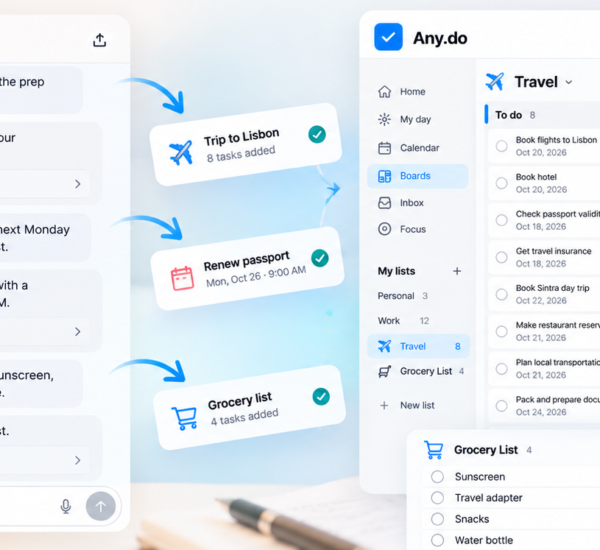
In Any.do, create at least two distinct lists: one for creative projects (with tasks at the project level, not the micro-step level) and one for business and administrative work (with fully specified, completable tasks). Some creatives add a third list for ideas and future projects, which functions as a capture space rather than an actionable list.
The creative projects list holds entries like “Draft chapter three,” “Complete first round of photo editing for the Henderson project,” or “Finish main composition for the EP.” Each entry represents a substantial unit of creative work, not a granular sub-step. The business list holds entries like “Send invoice for the March deliverable,” “Reply to the Nakamura brief by Friday,” and “Renew cloud storage subscription.” These are discrete, completable, dateable tasks.
Use the project list to track momentum, not steps
Creative projects do not progress linearly. A writing project might be 10% done for two weeks and then suddenly 70% done after one very good session. Breaking it into granular steps (“write paragraph one,” “write paragraph two”) creates false precision and often produces the opposite of creative flow by making the work feel mechanical.
Instead, use a single task per creative project that you move forward in date and update in the note field after each work session. The note becomes a running log of where you left off and what the next step feels like from where you are now. “Left off at the third section, need to figure out the transition before the final argument” is more useful to your next session than a checklist item that says “Write section four.” Ending each creative session with a note about where you left off makes re-entry much faster the next day, which is one of the biggest friction points in creative work.
Date creative work to protected blocks, not to deadlines
Client deadlines are real, but dating a creative task to its deadline does not help you actually do the work. A writing draft due Friday shows up in your task list on Friday, not on Monday when you should have started. The solution is to date creative project tasks to the days when you plan to actually work on them, not to the days when they must be finished.
This requires two things: knowing your own creative peak hours, and protecting them on your calendar. Most creative professionals have a rough window of peak creative energy, typically in the morning or late evening, that is noticeably better than the rest of the day for actual making. Blocking that window on your calendar and dating your creative tasks to the days within it converts the deadline logic into a production schedule. When Any.do shows your calendar and tasks together, you can see immediately whether your creative work is scheduled early enough in the week to actually finish before Friday.
Handling the Non-Linear Nature of Creative Projects
Build in revision time as separate tasks
Creative work almost always involves more revision cycles than initially expected. A common productivity trap for creative professionals is planning only for creation and not for revision, which means that the moment the first draft is done, the schedule collapses because revision time was never accounted for.
Add revision tasks explicitly: “First revision pass,” “Client revision round one,” “Final proofread before delivery.” Date these separately from the creation task, and give them realistic time. A 1,000-word article might take two hours to draft and another hour to revise. If you only block two hours total, revision either gets rushed or the delivery is late.
Capture ideas without letting them interrupt your current project
Creatives are rarely short of ideas. The problem is that new ideas arrive during the middle of existing projects and threaten to derail focus on the work that is already in progress. A quick-capture inbox solves this: a place to put any new idea, project concept, or creative observation immediately, with no friction, so it does not live in your head competing for attention with the work you are currently doing.
Any.do’s quick capture works well for this. Add the idea to your ideas list with a single tap, then return immediately to the work in progress. The idea is not lost. It is also not taking up mental bandwidth that belongs to the current project. Review the ideas list during your weekly planning session and decide which ones are worth pursuing, scheduling, or discarding.
Plan around energy, not just time
Standard productivity advice treats time as the primary resource to be managed. For creative professionals, energy is equally important and often more constraining. A two-hour creative session when you are fresh and mentally clear is worth more than five hours of grinding when your creative energy is depleted.
This means that the sequencing of tasks matters as much as the scheduling of them. Creative work goes in your peak energy window. Client emails, invoices, administrative coordination, and other clearly specified tasks go in the lower-energy parts of your day, typically after lunch or in the late afternoon when creative output quality drops but cognitive capacity for routine work remains adequate. Sequencing tasks by energy type is one of the highest-leverage adjustments creative professionals can make to their daily structure.
Managing Client Work Without Losing Creative Control
Client-facing creative work introduces external deadlines, revision requests, and approval cycles that can easily consume all available time and leave no space for the personal creative work that sustains a practice over the long term. The practical response is building explicit boundaries into your task system.
Create a rule about how many client projects run concurrently. More than two or three active client projects at the same time tends to mean none of them get the creative attention they need. When the client list in Any.do grows beyond that threshold, it is a signal to push a start date rather than a signal to work harder.
Track revision rounds explicitly. When a client requests changes, add a task for that revision round with a realistic completion date rather than absorbing it into the existing project task. This keeps the full scope of client work visible and prevents revision creep from silently expanding the project beyond what was originally planned.
Shared lists in Any.do work well for client-facing project coordination. A shared list where both you and the client can see what is in progress, what is in review, and what has been delivered creates transparency that reduces the “just checking in” messages that interrupt creative work. Shared task visibility is particularly useful for creative projects where the client needs reassurance that progress is happening even during the phases where the work is not yet visible.
The Weekly Review for Creatives
A weekly review is the single most effective practice for creative professionals who struggle with the balance between project progress and administrative obligations. Spend thirty minutes once a week, ideally on a Friday or Monday, reviewing three things:
- Creative project progress: Where is each active project relative to its delivery date? Is the pace realistic? Does anything need a schedule adjustment?
- Business and admin backlog: What came in this week that needs a response or a due date? What is sitting overdue that needs to be either done or explicitly deferred?
- Upcoming week: What are the creative work sessions this week, and are they protected on the calendar? What client deadlines are coming, and is there realistic time to hit them?
This review does not need to be elaborate. The goal is to start each week with a clear picture of where each project stands and a realistic plan for the days ahead, rather than discovering on Thursday that a deadline is Friday and the work is not done.
Structure That Serves the Work, Not the System
The right productivity system for a creative professional is one that holds the administrative and business layer firmly enough that nothing falls through, while leaving the creative work layer flexible enough to accommodate the reality of how making actually happens. Too much structure on the creative side produces anxiety and mechanical output. Too little structure on the business side produces missed deadlines and client frustration.
If you want a task management system that supports the kind of flexible, calendar-aware daily planning that works for creative schedules, Any.do is free to get started. The daily planner view with calendar integration, quick capture for ideas, and separate list structure give creative professionals the organizational layer they need without forcing creative work into a checklist it was never designed to fit.