The Two Rules at the Core of the Kanban Method
Visualize your work. Limit your work in progress. These two rules are the foundation of personal Kanban, the adaptation of the kanban method productivity framework for individual knowledge workers. They were articulated by Jim Benson and Tonianne DeMaria in their book Personal Kanban, distilled from the broader Kanban system developed by Taiichi Ohno at Toyota in the 1950s and later formalized for knowledge work by David J. Anderson. The kanban personal task management application of these rules is simple enough to implement in minutes and deep enough to change how you think about your work permanently.
The word “kanban” is Japanese for “signboard” or “visual signal.” The original system used physical cards to signal when production capacity was available to pull in more work. The insight that made it powerful was not the cards themselves but what the visual display revealed: the flow of work through a system, where it moved smoothly, and where it piled up. That insight, applied to personal productivity, is what makes the kanban method a different kind of tool than a task list.
Why Visualizing Work Changes How You See It
A task list tells you what needs to be done. A Kanban board tells you the state of everything at once. The difference is significant. When you look at a flat list of tasks, you see items in sequence: first this, then that, then the other. The list does not show you how many things are in progress simultaneously, where work is stuck, or what the actual flow of your work looks like across a day or week.
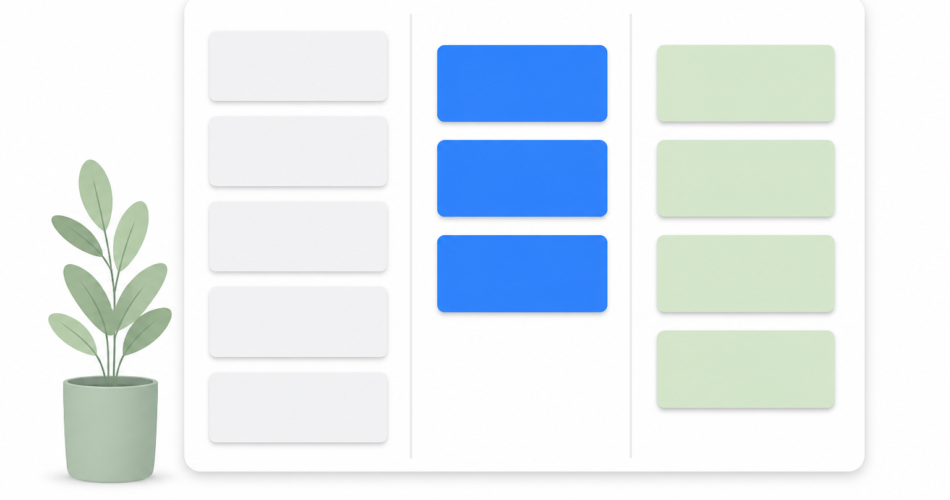
A Kanban board adds the dimension of stage. The standard personal board has three columns: To Do, In Progress, and Done. Every task exists in exactly one column at any moment. When you move a task from To Do to In Progress, you make a visible commitment: this is active work. When you move it to Done, you see a concrete record of completion. The board as a whole shows you the state of your work at a glance, not just a list of items.
What the visual display tends to reveal, almost immediately, is how much work is “in progress” in practice. Most people, if they mapped their current work honestly, would find that their In Progress column holds far more items than they can realistically complete in the near term. The visual representation of this, seeing a dozen items marked as “active” work on a board, creates a different kind of awareness than scrolling through a flat task list where the same overcommitment is invisible.
The WIP Limit: The Key Insight of the Kanban Method
The rule that most distinguishes Kanban from other visual productivity systems is the work in progress (WIP) limit. A WIP limit is a maximum number of items allowed in a column at any given time, most critically in the In Progress column. When the limit is reached, no new items can move in until an existing item moves out by being completed.
WIP limits sound restrictive. They are the opposite. The purpose of a WIP limit is to make the cost of switching between too many concurrent tasks visible and to force a choice. If your In Progress column has a WIP limit of three and it is currently full, the only way to start something new is to finish something that is already in progress. This pull discipline prevents the accumulation of half-done work that characterizes a multitasking approach to productivity.
The research on multitasking consistently shows that working on fewer things simultaneously produces more output than working on many things at once, because the cost of switching attention between active tasks is real and substantial. Single-tasking is the daily execution of what WIP limits enforce at the system level. WIP limits make the overcommitment visible before it becomes a crisis.
How to Set Up a Personal Kanban Board
Personal Kanban can be implemented with sticky notes on a wall, columns in a spreadsheet, or a digital tool. The physical setup is fast regardless of medium:
Create three columns
Start with the three-column structure: To Do, In Progress, Done. To Do holds everything that is queued and waiting. In Progress holds what is actively being worked on. Done holds completed items, which can be cleared or archived periodically.
As your practice matures, you can add columns that reflect how your work actually moves. A Waiting column for tasks blocked on someone else’s action. A Review column for work that is done on your end but needs external approval. A This Week column between To Do and In Progress that narrows the visible backlog to what is actually planned for the current week. These additions are optional. The three-column version is sufficient to start and to get the core benefits.
Add all active and upcoming tasks
Populate the board with your current tasks. Everything that is not yet started goes in To Do. Everything you are actively working on goes In Progress. The act of populating the board is often the first moment of clarity: seeing the In Progress column fill up with everything that has been started but not finished reveals the scope of concurrent work that was previously invisible in a flat list.
Set a WIP limit for In Progress
Decide on a WIP limit for your In Progress column. For most individual knowledge workers, a limit of three to five items reflects a realistic amount of concurrent active work. The right number depends on your work style and the nature of the tasks. A WIP limit of one is the strictest form of single-tasking. A limit of five allows more simultaneous projects while still preventing runaway overcommitment.
The limit does not mean you can only have three active projects. It means you can only have three tasks in active progress at any moment. A project can be in progress with one active task while its other tasks wait in To Do, queued for when capacity is available.
Work by pulling from To Do into In Progress
The operating discipline of a Kanban board is pull rather than push. You do not add new work to In Progress because it arrived. You pull the next most important item from To Do when you have capacity, specifically when the In Progress column is below its WIP limit. This “finish before starting” discipline is what prevents the accumulation of half-done work.
The prioritization of what to pull next is a daily decision that should reflect your most important work, not just what is most recently added to the backlog. The To Do column is a backlog to be prioritized, not a queue to be processed in order of arrival.
The Kanban Method vs the Task List
The kanban method productivity approach and a standard task list are not competing systems. They are different representations of work, suited to different questions. A task list answers “what needs to be done?” A Kanban board answers “what is the state of my work right now, and where is it flowing or stuck?” For users who want both, a task manager and a visual flow representation can coexist: the task manager handles capture, due dates, priorities, and daily planning; the Kanban board handles the visual flow picture that makes overcommitment visible.
Trello is the most widely used Kanban-style tool for personal and team use, and it captures the visual board experience well. For users who want both the board visualization and a task manager with daily planning, calendar integration, and mobile capture, the combination of a Kanban board for project-level visualization and Any.do for daily task management and planning covers both layers without asking either tool to do something it was not designed for.
Personal Kanban for Knowledge Work
The kanban personal task management application works especially well for people who manage several concurrent projects or ongoing responsibilities rather than a single, linear workflow. The board makes the portfolio of active work visible in a way that supports the kind of judgment calls knowledge workers make constantly: which project needs attention today? Where is work stuck? What can be moved forward this week to create space for the next priority?
The Done column also provides something that a task list does not: a visible record of completed work. At the end of a week, the Done column shows what moved. This is useful for self-assessment and for communicating progress to managers or collaborators. The sense of accomplishment from seeing completed items accumulate on a board is different from checking boxes on a list, because the visual summary tells a story of flow rather than just count.
Scheduling big rocks first and then organizing the remaining work on a Kanban board is one way to combine the weekly priority-setting discipline of the Big Rocks method with the visual flow management of Kanban. The big rocks get scheduled calendar time. The Kanban board manages the flow of the surrounding work. Both operate together without conflict.
Start With a Board for Your Current Work
The entry point for the kanban method is a ten-minute exercise: take your current task list and sort every item into one of three columns, To Do, In Progress, Done. Look at the In Progress column. If it has more than five items, you are overcommitted in ways that a flat list was not showing you. Set a WIP limit of three. Move everything above three back to To Do. Notice which three items you actually want to be actively working on right now.
That is the core of the kanban method in practice. The visualization and the WIP limit are the two insights that change how you work. Everything else is refinement built on those two rules.
If you want a daily task management system that supports the kanban flow discipline with a daily planner view, calendar integration, and the list structure to manage your backlog alongside your active work, time-blocking the most important items from your In Progress column into your calendar gives the Kanban board’s pull discipline a concrete schedule to execute against. Any.do is free to get started as the daily planning layer alongside whatever Kanban board you use for visual flow management.