
Why Work From Home Productivity Is Harder Than It Looks
Work from home productivity does not fail because people are lazy. It fails because the home environment removes almost every structural support that an office provides automatically. In an office, the physical separation from home signals work mode. Colleagues create ambient accountability. The commute creates a transition ritual. Meeting rooms enforce schedule discipline. None of that exists at home. The home office requires you to manufacture all of it deliberately, and the people who struggle with WFH productivity are usually not failing at discipline. They are failing to build the structures that make discipline unnecessary.
WFH productivity tips that focus on motivation or willpower miss the point. The remote worker who is most productive is not the one who wants it more. It is the one who has built an environment and a system that channels their natural behavior toward focused work without requiring constant self-management. This is the design challenge of working from home, and it is solvable through structure rather than self-discipline.
The Three WFH Productivity Problems That Matter Most
Problem 1: No clear start or end to the workday
In an office, the commute in and the commute out create natural boundaries. Work starts when you arrive and ends when you leave. At home, there is no arrival and no departure. Work can start the moment you wake up and end whenever you fall asleep. This boundarylessness is the root cause of two opposite problems: overworking, where work bleeds into every hour because it is always accessible, and underworking, where the absence of a structured start means the workday never fully begins.
The fix is artificial boundaries that replicate what the commute provided. A consistent start time that is marked by a specific ritual, such as making coffee, changing out of pajamas, or sitting down at a dedicated workspace. And a consistent end time marked by a deliberate shutdown routine that closes out the workday completely before the rest of the day begins.
The shutdown ritual is one of the most effective WFH productivity practices available, precisely because it creates the boundary that a physical office departure creates automatically. Reviewing completed tasks, capturing open items, planning tomorrow, and saying “shutdown complete” gives the brain the clear signal it needs to disengage from work mode. Without that signal, work thoughts intrude into personal time indefinitely.
Problem 2: Constant low-grade interruption
The home environment is full of interruptions that an office filters out. Household tasks that catch your eye. Family members who assume that working from home means available to talk. Deliveries, appliances, the kitchen. The television. None of these interruptions are as dramatic as a colleague stopping by your desk, but they accumulate into a pattern of constant partial distraction that prevents sustained deep work.
The structural response is creating a physical and temporal workspace that signals unavailability. A dedicated workspace with a door that closes, or at least a specific spot that is only used for work. Noise-canceling headphones as an unavailability signal. Clear communication to family or housemates about which hours are focus hours and what constitutes an acceptable interruption during those hours. And notifications off during focus blocks: not on silent, actually off.
Problem 3: No structure for what to work on next
In an office, external structure provides a continuous stream of direction: the meeting schedule, the manager who stops by, the colleague who asks about the project status. At home, you are often the only source of direction for your own work. When you finish one task, the decision about what to do next is entirely yours, and that decision process consumes time and cognitive energy throughout the day.
The solution is pre-making decisions about what comes next before you need to make them. A task list with priorities and due dates that is reviewed and sequenced the night before means you sit down in the morning knowing exactly what the first task is. You do not decide. You execute. Pre-selecting priorities the night before eliminates the decision fatigue that accumulates when you rely on in-the-moment choices about what to work on.
Building a WFH Productivity System That Works
Design your workday before it starts
The most consistent work from home productivity pattern is the workday designed in advance. Each evening or at the end of the workday, spend ten minutes planning tomorrow: what are the two or three tasks that must happen, when will each happen, and how do they fit around any calls or meetings on the calendar?
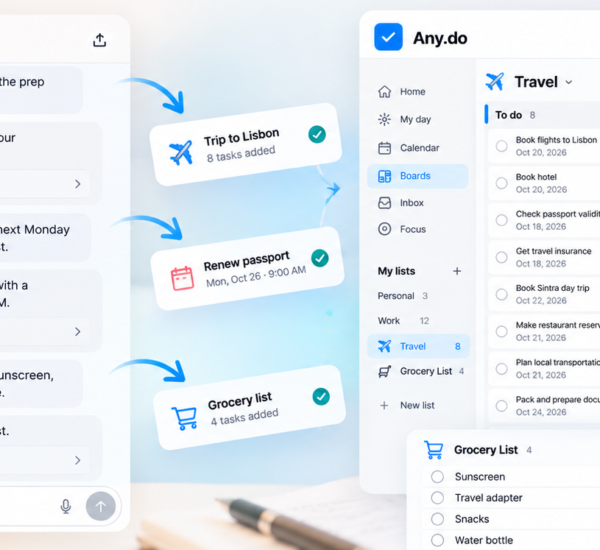
Any.do’s daily planner shows your tasks and calendar events in the same view, which makes this planning step both fast and realistic. When you can see that Thursday has two hours of meetings and a one-hour call, you know that committing to four hours of focused work is unrealistic. Planning against the actual calendar prevents the common failure of building an ambitious task list for a day that the calendar has already allocated elsewhere.
Time-block your focus work
WFH productivity depends on focus work getting protected time rather than getting squeezed into whatever gaps remain after reactive work. Time blocking is the practice of assigning specific tasks to specific calendar windows, treating those windows as appointments with yourself. A two-hour block for your most important project at 9am is as protected as a client call at 11am.
The physical separation between home and office is absent when you work from home, but the temporal separation between focus time and available time can be made explicit on a calendar. A blocked calendar communicates unavailability in a way that a mental intention does not. It also gives you something concrete to protect rather than an amorphous commitment to “work on the project when I have time.”
Create a startup routine
The morning startup routine is the WFH equivalent of the commute. It is the ritual that transitions you from home mode to work mode. The routine itself matters less than its consistency. A ten-minute sequence that you do every workday morning in the same order, ending with opening your task list and confirming today’s focus tasks, trains the brain to enter work mode at a predictable time.
Effective startup routines typically include a physical component (changing clothes, making coffee, brief movement), a review component (checking the calendar, reviewing the task list), and a commitment component (identifying today’s one most important task before anything else). The review and commitment steps take two minutes in Any.do’s daily planner view, where tasks and calendar are visible together.
Batch reactive work to protect focus time
Email, Slack, and messaging apps are the most consistent work from home productivity killers because they create a constant pull toward reactive work that interrupts any focus task that is in progress. The structural response is batching reactive work into defined time windows rather than responding continuously throughout the day.
Two or three defined email and messaging check-in windows per day, fifteen to thirty minutes each, handle almost all legitimate communication needs while preserving the rest of the day for focused work. During focus blocks, messaging apps are closed, not minimized. The difference between closed and minimized is significant when the pull toward checking is strong.
WFH Productivity and the Energy Management Problem
Work from home productivity is not just a time management problem. It is an energy management problem. The home environment removes the social energy that an office provides, but it also removes the commute drain and the open-plan office stimulation. For most people, working from home means more energy available for deep work but also less external motivation to push through low-energy periods.
Managing energy in a WFH context means scheduling demanding cognitive work for your peak energy window, which for most people is mid-morning, and protecting that window from meetings, admin, and reactive work. Low-energy periods in the early afternoon are better used for administrative tasks, email, and routine work that does not require sustained concentration.
Tracking your energy patterns over a few weeks reveals your personal peak window with more accuracy than any general advice can. Any.do’s daily review at shutdown is useful for this: noting which tasks felt effortless and which felt like a struggle at different times of day builds a personal energy map that makes future scheduling decisions more accurate.
The Home Office Environment
The physical workspace has a larger effect on work from home productivity than most remote workers expect. A dedicated workspace that is only used for work trains the brain to enter focus mode when you sit there and disengage when you leave. A workspace that also functions as a kitchen table, a television lounge, or a bedroom creates ongoing ambiguity that makes it harder for the brain to commit to either work mode or rest mode.
The minimum viable home office is a specific spot, used only for work, with the screen positioned away from household distractions. Good lighting. A comfortable chair. Noise-canceling headphones for focus sessions. These are not luxuries. They are infrastructure investments in your ability to do focused work, and they pay back in recovered productivity many times over their cost.
Start With the Boundary, Then Build the System
The most impactful single change most work from home workers can make is creating a clear end to the workday. Not a vague intention to stop working at some point. A specific time, marked by a specific ritual, after which work is closed and personal time begins. Everything else in a WFH productivity system is built on top of that boundary.
If you want a task management and planning system that supports structured work from home days, Any.do is free to get started. The daily planner view, time-blocked tasks alongside your calendar, and the shutdown review give you the structure that makes work from home sustainable rather than just possible.