What Makes the Best Daily Planner App in 2026?
The best daily planner app is the one you actually open every morning. That sounds obvious, but it explains why so many people cycle through productivity apps every few months. A planner can have every feature imaginable and still fail if it takes too long to capture a task, requires too much setup to maintain, or does not connect to the calendar you already use. For this roundup, we tested seven daily planner apps on three criteria: how well they handle task capture, how naturally they show tasks alongside your calendar events, and how low the friction is to keep using them past the first week.
The 7 Best Daily Planner Apps in 2026
1. Any.do
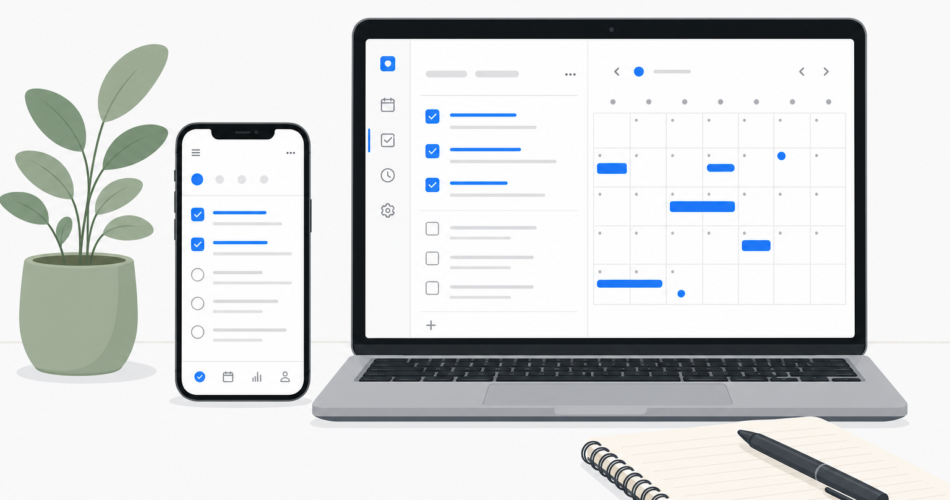
Any.do is the best daily planner app for most people in 2026. The core experience is a unified view of your tasks and calendar events, which sounds simple but is surprisingly rare. When you open Any.do in the morning, you see what is on your calendar and what is on your task list in one place, without switching tabs or apps. The AI assistant suggests what to work on based on your upcoming events and task deadlines, but does not take over your schedule.
Any.do works for personal and professional tasks in the same app, syncs across iOS, Android, and web, and has a functional free tier. The premium plan adds calendar sync, recurring tasks, and the AI planning features. For anyone who has been using a separate to-do app and a separate calendar and feeling like the two never talk to each other, Any.do’s unified view is the direct solution.
Best for: People who want tasks and calendar in one view without complex setup.
Free tier: Yes, functional.
Pricing: Free; premium available monthly or annually.
2. Todoist
Todoist is one of the most polished task managers available, with a clean interface, natural language task entry, and a strong reputation for reliability. Its daily planner view, called “Today,” shows tasks due on the current date. The calendar integration exists but functions as a separate view rather than a native unified experience.
Todoist wins on depth: labels, filters, priority levels, and project organization are all more granular than Any.do. For users who want to build sophisticated task systems with complex filtering, Todoist has more to offer. The free tier is more limited than Any.do’s, and the premium pricing is competitive.
Best for: Power users who want deep task organization and filtering.
Free tier: Yes, limited.
Pricing: Free; Pro at $4/month (annual).
3. Notion Calendar (formerly Cron)
Notion Calendar is a calendar-first daily planner that integrates with Notion for task management. If your team already lives in Notion, this combination creates a genuinely unified planning experience: tasks from your Notion databases appear in the calendar, and meetings from Google Calendar appear alongside them.
The limitation is the Notion dependency. If you are not already using Notion, setting this up requires adopting two new tools rather than one. The learning curve is real. For teams already in the Notion ecosystem, this is a strong option. For everyone else, it is probably more than necessary.
Best for: Teams already using Notion who want calendar integration.
Free tier: Yes.
Pricing: Free; Notion workspace required for full task integration.
4. Motion
Motion takes a different approach: rather than showing you your tasks and letting you decide when to work on them, its AI automatically schedules tasks into your calendar based on priority, deadline, and available time slots. When your day changes, Motion reschedules everything automatically.
This is genuinely useful for a specific type of user: someone with a very high task volume, good discipline about estimating task durations, and willingness to let an algorithm own their schedule. For people who struggle with time estimation or who want to stay in control of their own planning, Motion creates more friction than it removes. It has no free tier, and at $19/month for individuals it is among the most expensive options here. A full comparison of Motion vs Any.do covers the differences in detail.
Best for: High-volume task users who want full AI auto-scheduling.
Free tier: No (trial only).
Pricing: From $19/month individual.
5. Google Tasks + Google Calendar
If your entire life runs on Google, the combination of Google Tasks and Google Calendar is a zero-cost daily planner that requires no new apps. Tasks appear directly in the Google Calendar interface, and the mobile experience is functional. The limitations are real though: no subtasks beyond one level, no cross-platform sync outside the Google ecosystem, no AI features, and no shared task lists for team use.
For someone who needs the absolute simplest system and already uses Google Calendar heavily, this works. For anyone who wants even modest task management features, it runs out of capability quickly.
Best for: Google-ecosystem users who want the simplest possible setup at no cost.
Free tier: Entirely free.
Pricing: Free.
6. Structured
Structured is a visual daily planner that displays tasks as time blocks on a timeline. You see your day laid out as a visual schedule, which works well for people who think spatially about their time. The interface is clean and satisfying to use.
The limitation is scope. Structured handles daily scheduling well but lacks the project organization, recurring task flexibility, and cross-device sync depth that make a daily planner useful over weeks and months rather than just today. It is a strong choice for someone who wants a visual daily view and does not need a full task management system underneath it.
Best for: Visual planners who want a timeline-based daily schedule.
Free tier: Yes, limited.
Pricing: Free; Pro available.
7. TickTick
TickTick is a full-featured daily planner app with a built-in calendar view, habit tracking, Pomodoro timer, and task management. It competes directly with Any.do and Todoist on features and generally delivers on all of them. The interface is slightly more complex than Any.do’s, which some users appreciate for the additional control and others find overwhelming.
TickTick’s built-in Pomodoro timer and habit tracker make it particularly appealing for users who want those features without a separate app. The calendar integration is solid. Premium pricing is comparable to Any.do and Todoist.
Best for: Users who want a single app covering tasks, habits, and Pomodoro sessions.
Free tier: Yes, functional.
Pricing: Free; Premium at $3.99/month (annual).
Daily Planner App Comparison: Quick Reference
| App | Calendar Integration | AI Features | Free Tier | Cross-Platform |
|---|---|---|---|---|
| Any.do | Native unified view | Yes, AI planning assistant | Yes, functional | iOS, Android, Web, Desktop |
| Todoist | Add-on, separate view | Limited | Yes, limited | All platforms |
| Notion Calendar | Strong with Notion | Via Notion AI | Yes | All platforms |
| Motion | AI auto-scheduling | Full auto-scheduler | No | iOS, Android, Web |
| Google Tasks | Built into Google Cal | No | Entirely free | Google ecosystem only |
| Structured | Calendar view only | No | Yes, limited | iOS, Android |
| TickTick | Built-in calendar view | Limited | Yes, functional | All platforms |
How to Choose the Best Daily Planner App for Your Situation
If you want tasks and calendar in one view without learning a new system
Any.do is the direct answer. The unified task and calendar view is the central feature, the setup takes minutes, and the free tier covers the core daily planning workflow. How Any.do’s calendar and task integration works explains why the unified view changes how you experience your day.
If you want sophisticated task organization with labels and filters
Todoist has the deeper task management system. It is worth the slightly steeper learning curve if you need complex project organization across many contexts.
If you want AI to schedule your entire day automatically
Motion is the only mainstream app built specifically for full auto-scheduling. The cost and complexity are real, but for the right user it delivers something no other app does.
If you want everything in one app including habits and Pomodoro
TickTick covers more ground than any other app on this list. The interface is more complex, but if you want habits, timers, tasks, and calendar without juggling multiple apps, TickTick is the strongest single-app solution.
What the Best Daily Planner App Actually Needs to Do
The best daily planner apps solve the same problem from different angles: you have things to do, you have a schedule, and you need a way to see them together and make decisions about your time. The app that does that with the least friction, in a format that matches how you think, is the right one for you.
The patterns that cause people to abandon their daily planner apps are also consistent: too much setup required to maintain the system, poor mobile capture experience, or a calendar view that feels disconnected from the task list. Any app you consider should handle those three things well before anything else.
For most people, starting with Any.do covers the fundamentals cleanly. The time blocking approach pairs naturally with Any.do’s daily planner view for people who want to take daily planning a step further.
Try Any.do Free Today
If you are looking for a daily planner app that shows your tasks and calendar events in one view, works across all your devices, and takes under five minutes to set up, Any.do is worth trying first. The free tier covers everything you need to see whether the unified planning view works for you.
Start with Any.do for free and have your first day planned before your first meeting.