ClickUp vs Any.do: The Short Answer
If you are comparing clickup vs any.do for your team, here is the honest summary upfront: ClickUp is one of the most feature-rich project management platforms available, built for teams that want to customize everything and manage complex work in one place. Any.do is a simpler, faster tool that combines tasks, calendar, and team collaboration in a clean interface that most people can use without any training. Which one is right for your team depends almost entirely on how much complexity you actually need.
What Is ClickUp?
ClickUp is a project management platform founded in 2017 with a stated goal of replacing every other productivity tool. It offers an enormous feature set: tasks, docs, whiteboards, goals, time tracking, custom fields, automations, dashboards, sprints, Gantt charts, and more. Teams can customize almost every aspect of how work is organized and displayed.
This flexibility is ClickUp’s biggest strength and also its most common complaint. The learning curve is steep. New users often feel overwhelmed before they feel productive. ClickUp offers a generous free tier, and paid plans start at $7 per user per month.
What Is Any.do?
Any.do is a productivity platform that combines task management, calendar integration, team collaboration, and an AI assistant in a single clean interface. It is designed to be simple enough for personal use while being powerful enough for small and growing teams. The focus is on getting things done quickly rather than on configuring a system.
Any.do works across iOS, Android, Mac, Windows, and the web, and its native calendar integration means tasks and events appear in the same view. You can read more about how Any.do’s calendar integration works and why it matters for daily planning.
ClickUp vs Any.do: Feature by Feature
Task Management
Both tools handle core task management well: creating tasks, assigning them, setting due dates, adding subtasks, and attaching files. ClickUp goes significantly further with custom statuses, custom fields, task dependencies, sprints, and dozens of ways to view and filter work. For teams managing complex, multi-phase projects, ClickUp’s depth is genuine.
Any.do covers the essentials without the overhead. You can create tasks, break them into subtasks, assign them to team members, set reminders, and organize them into shared lists. For most growing teams, this is everything they actually use day to day.
Winner: ClickUp for complex project management. Any.do for teams that want to move fast.
Calendar Integration
Any.do’s calendar integration is native and built into the core experience. Tasks and calendar events live in the same view. You can see what you have scheduled, what is due, and plan your day without switching between apps. This is one of the biggest practical advantages Any.do has over most competitors.
ClickUp has a calendar view, but it is project-focused rather than personal. There is no unified daily view that combines your tasks with your Google Calendar or Outlook events. If your team needs to see tasks and meetings together, this is a meaningful gap.
Winner: Any.do.
Ease of Use and Setup
ClickUp’s power comes with real complexity. Most teams need dedicated time to set up their workspace, define their hierarchy (spaces, folders, lists, tasks), and train team members. The onboarding process is thorough but substantial. This investment can pay off for larger teams with complex workflows, but for a growing team of 5 to 20 people who just want to get organized, it is often more than they need.
Any.do is built to be picked up immediately. You can create a shared list, invite your team, and start assigning tasks in minutes. There is no workspace architecture to design.
Winner: Any.do.
Views and Visualization
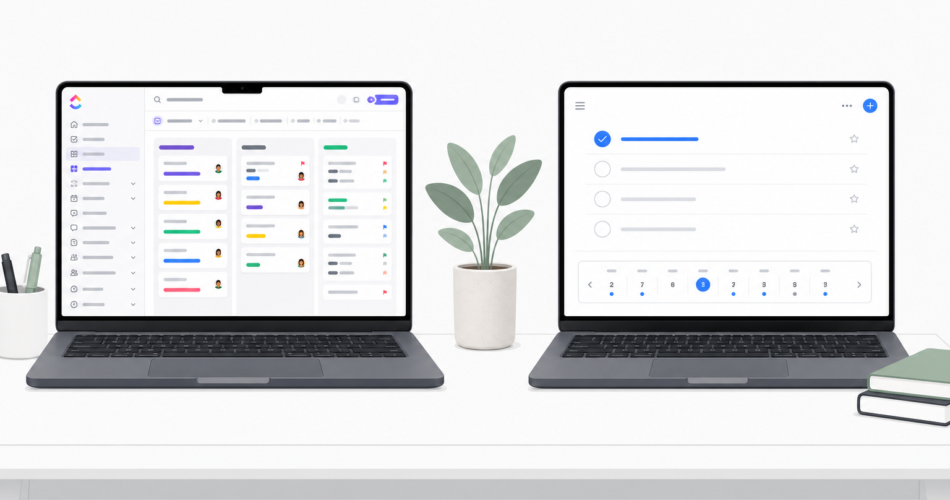
ClickUp is genuinely excellent here. List view, board view, Gantt chart, timeline, calendar, table, mind map, workload, and more. If your team needs to visualize dependencies across multiple projects over time, ClickUp has dedicated views for it.
Any.do offers list view, board view, daily planner, and calendar view. It covers the most common use cases but does not offer Gantt-style timelines or workload views.
Winner: ClickUp for teams that need advanced visualization. Any.do for teams that work primarily in list or board mode.
AI Features
Any.do’s AI assistant is integrated into the daily planning experience. It can suggest task priorities, help plan your day based on your schedule, and organize your inbox automatically. For growing teams without dedicated project managers, this kind of proactive assistance fills a real gap.
ClickUp has introduced AI features in paid tiers, focused mainly on summarizing tasks, writing content, and generating automations. Both are useful, but they solve different problems.
Winner: Any.do for personal AI planning assistance. ClickUp for AI-powered project automation.
Team and Personal Use
Any.do was built to handle both personal and team use naturally. The same app that manages your shared team projects can hold your grocery list and personal reminders. For growing teams where people also use the tool for personal productivity, this integration is seamless.
ClickUp is purpose-built for professional team use. It does not really support personal tasks or family coordination, and the interface is not designed for casual personal use.
Winner: Any.do.
Pricing
| Plan | ClickUp | Any.do |
|---|---|---|
| Free | Yes (limited storage and features) | Yes (individuals) |
| Starter/Personal | $7/user/month | Lower per user |
| Business | $12/user/month | Team plan available |
For a team of 10 people, ClickUp’s Business plan runs $120 per month. Any.do’s team plan is more affordable at comparable team sizes, which matters when you are in a growth phase and watching costs.
Winner: Any.do for cost efficiency at small and mid-size team scales.
What ClickUp Does Better
Being honest means acknowledging where ClickUp genuinely wins:
- Project complexity: Task dependencies, sprints, and multi-level hierarchies that Any.do does not support
- Customization: Custom fields, custom statuses, custom views for every team’s specific workflow
- Reporting: Dashboards, workload analysis, and project progress reporting
- Docs and wikis: Built-in document creation that keeps reference material alongside tasks
If your team manages large, interdependent projects and needs a single platform for all project documentation and reporting, ClickUp is the right tool.
When to Choose Any.do Over ClickUp
- Your team is 2 to 20 people and you want something everyone will actually use consistently
- Calendar integration is important and you want tasks and events in one view
- You want to be running the same day without dedicated setup time or training sessions
- Your team also uses personal tasks and wants one app for both work and life
- Cost matters and you want strong collaboration features without per-user ClickUp pricing
The Bottom Line
For most growing teams, especially those in the 5 to 20 person range, Any.do is the stronger practical choice in 2026. The lower learning curve means faster adoption, the calendar integration solves a real daily planning problem, and the AI assistant helps fill the project management gap that smaller teams often face.
ClickUp earns its place for teams with genuinely complex project management needs. But if your team spends more time struggling with the tool than using it, simpler is almost always better.
If you are exploring the clickup alternative space and want to see how Any.do handles team collaboration and daily planning, try Any.do free and have your team set up within the hour.