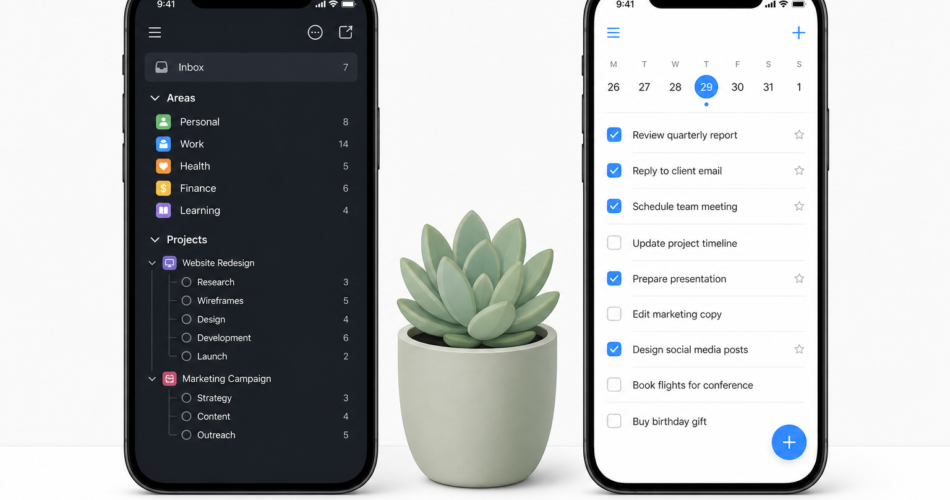
Things 3 vs Any.do: Two Good Apps for Different People
The things 3 vs any.do comparison is genuinely close in a way that most app comparisons are not. Both are polished, well-designed task managers with strong user bases and good reputations. The differences come down to platform, philosophy, and what kind of user you are – not which app is objectively better.
This comparison looks honestly at both, including where each one wins, and helps you decide which is the better fit for your workflow.
What Is Things 3?
Things 3 is a task manager made by Cultured Code, a small German software company. It is widely considered one of the best-designed productivity apps ever made. The interface is clean, the interactions are thoughtful, and the app has won Apple Design Awards. Things 3 supports a full GTD-style workflow with areas, projects, headings, tags, and a powerful inbox. It has been a favorite of productivity enthusiasts for over a decade.
There are two significant constraints. First, Things 3 is Apple-only: it runs on Mac, iPhone, iPad, and Apple Watch, but there is no Android app, no Windows app, and no web app. Second, Things 3 is a one-time purchase rather than a subscription, which appeals to some users but means the apps must be bought separately for each platform ($9.99 for iPhone, $19.99 for iPad, $49.99 for Mac).
What Is Any.do?
Any.do is a cross-platform productivity app that combines task management, calendar integration, team collaboration, and an AI assistant. It runs on iOS, Android, Mac, Windows, and the web, and it syncs across all of them in real time. Any.do is built around the idea that tasks and calendar events should live together, not in separate apps.
Any.do is available on a freemium model: the free tier is genuinely useful, and the premium plan adds features like recurring tasks, color labels, calendar sync, and AI planning. The premium plan is subscription-based. You can read more about how Any.do’s calendar integration supports daily planning and why it is one of the most-cited reasons people choose it.
Things 3 vs Any.do: Feature by Feature
Design and Interface
Things 3 has one of the most beautiful interfaces in the productivity app category. The animations are smooth, the typography is excellent, and every interaction feels considered. If you spend a lot of time in your task manager and visual quality matters to you, Things 3 is genuinely a pleasure to use.
Any.do is clean and well-designed but does not reach the same level of interface craft as Things 3. It is functional, modern, and easy to navigate, without being exceptional from a pure design standpoint.
Winner: Things 3.
Platform Support
This is the clearest differentiator in the things 3 vs any.do comparison. Any.do works on every major platform: iOS, Android, Mac, Windows, and web. Things 3 is Apple-only. If you or anyone on your team uses an Android device or a Windows computer, Things 3 is simply not an option.
Winner: Any.do, by a wide margin.
Calendar Integration
Any.do’s calendar integration is native and central to the experience. Tasks and calendar events live in the same view. You can see what you have scheduled, what is due, and plan your day in one interface without switching apps. This is one of the core reasons people use Any.do for daily planning.
Things 3 shows tasks organized by day and has a “Today” view that includes your calendar events (via Apple Calendar integration). This is useful but less integrated than Any.do’s approach. The calendar events appear as context, while in Any.do they are first-class items alongside your tasks.
Winner: Any.do.
Team Collaboration
Any.do supports shared boards, task assignment, and team collaboration. You can share a project board with colleagues, assign specific tasks, set due dates, and track completion together. Shared task management for teams is a built-in use case for Any.do.
Things 3 has no collaboration features. It is a personal productivity app, full stop. There is no way to share a project or assign a task to another person. If you need any team functionality, Things 3 is not the right tool.
Winner: Any.do.
Task Organization Depth
Things 3 has a notably thoughtful organizational structure. You can create Areas (broad life domains like Work or Personal), Projects within those areas, headings inside projects, and tasks with tags and notes. The hierarchy is flexible and supports complex personal organization without becoming overwhelming.
Any.do uses lists, tasks and subtasks as the organizing structure, which is simpler and easier to get started with. Subtasks let you break work into steps within any task. For most users, this is sufficient. For power users who want fine-grained hierarchical organization of their personal projects, Things 3 goes deeper.
Winner: Things 3 for personal power users. Any.do for users who want simplicity that scales.
AI Features
Any.do includes an AI assistant that helps plan your day, suggest task priorities, and organize your inbox automatically. This is a meaningful addition for users who want help deciding what to work on, not just a place to store what needs to be done.
Things 3 has no AI features. It is a manual, deliberate system. If you prefer to be in full control of your task organization without any AI suggestions, this may be a feature, not a limitation.
Winner: Any.do.
Pricing
| Plan | Things 3 | Any.do |
|---|---|---|
| Entry | $9.99 (iPhone), $19.99 (iPad), $49.99 (Mac) – one-time | Free tier available |
| Premium | No subscription – buy once per platform | Monthly or annual subscription |
| Team | Not available | Team plan available |
Things 3’s one-time pricing is appealing for users who prefer to own software rather than subscribe. If you use Things 3 for several years, the math often favors Things 3 over a monthly subscription. However, the full Apple ecosystem purchase (iPhone + iPad + Mac) adds up to nearly $80, and there is no free trial period before you commit.
Any.do’s free tier lets you try the app fully before paying anything, and the premium subscription is available month-to-month without a long-term commitment.
Winner: Depends on your preference. Things 3 for one-time buyers. Any.do for flexibility.
What Things 3 Does Better
Being honest about the things 3 alternative question means acknowledging where Things 3 genuinely wins:
- Interface design: Things 3 is among the most beautifully designed apps on any platform
- Personal organizational depth: Areas, projects, headings, and tags give power users more structure
- One-time pricing: Pay once and own it, with no ongoing subscription cost
- Privacy: Things 3 stores data locally by default, with optional iCloud sync – no third-party server backup
When to Choose Any.do Over Things 3
- You use Android or Windows – Things 3 simply does not exist on these platforms
- You need team features – shared boards, task assignment, and collaboration are Any.do-only
- Calendar integration matters – Any.do’s unified task and calendar view is more cohesive
- You want AI assistance for daily planning and prioritization
- You want to try before you buy – Any.do’s free tier removes the risk
The Verdict
If you are an Apple-only user who works independently, values exceptional design, and prefers to own software rather than subscribe to it, Things 3 is one of the best personal task managers you can buy. It has earned its reputation.
If you use any non-Apple device, work with a team, want calendar and task management unified, or prefer to start for free, Any.do is the stronger choice. The cross-platform support alone makes it the more practical option for most people in 2026.
If you are looking at things 3 alternatives and want to see how Any.do compares in practice, try Any.do free and have it set up in a few minutes without any upfront cost.